[x]
All Deviations
All Deviations

©2006-2008 *Snigom
Details
Submitted: December 1, 2006
File Size: 2.6 MB
Image Size: 2.6 MB
Resolution: 1008×6120
Comments: 31
Favourites & Collections: 59 [who?]

Views
Total: 2,915
Today: 1

Downloads
Total: 67
Today: 0

Embed


Thumb

Artist's Comments

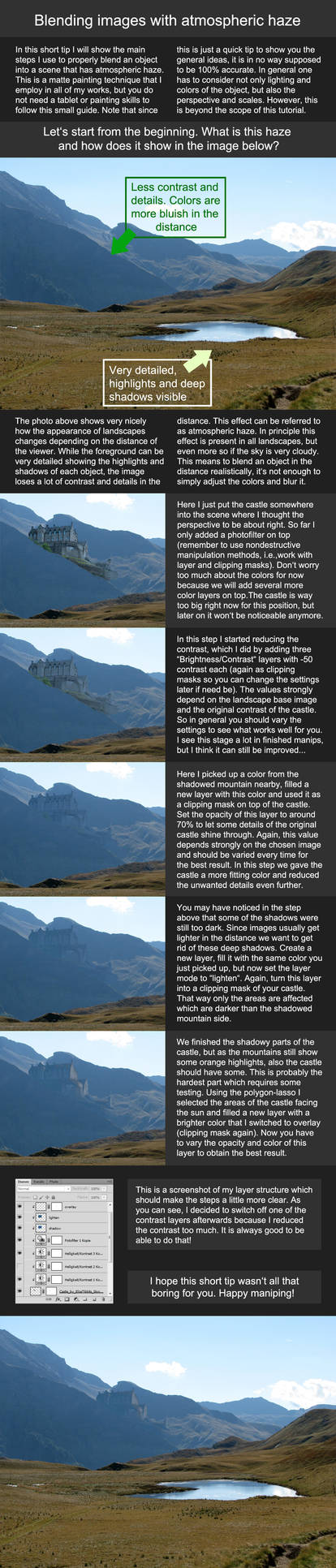
ROCK FACE TUTORIAL FOR PHOTOSHOP CS2

(note: This Tutorial will work in ALL versions down to 4.0 however, some of the features were located in different areas in lower versions.)

OK! So my first Photoshop Tutorial is finished. I have done these before...but in Microsoft Word. So forgive me if it's not 'flashy' and neat looking like some others. I just didn't have alot of time. However, it does have a bunch of neat screen shots! :D

Please send me a note if you have any questions about this tutorial or any of the features listed. I'll help out any way I can.

Remember this is only 1 of 3. They get more complicated from here on out, but if you complete them, you will be stronger in Photoshop.
[x]

Devious Comments

love 0 0 joy 0 0 wow 0 0 mad 0 0 sad 0 0 fear 0 0 neutral 0 0

*Snigom:iconSnigom: Dec 1, 2006, 6:06:58 PM
I hate that when I am so tired that I can even SPELL!!!!

PLEASE FORGIVE ME THE SPELLING ERRORS!!!

No Spelling Nazi's...please :please:

--
Your focus determines your reality. So be mindful of your thoughts.

Ask it what it has to teach you then let it go. It only has as much power over you as you give it.
*BartBar:iconBartBar: Dec 1, 2006, 6:29:27 PM
Hey wow that's really cool. I never thought of using the clouds thingy to create rock patterns before.

*runs off to try*
*Snigom:iconSnigom: Dec 1, 2006, 9:16:07 PM
Let me know if it works out for you. I must know if I am to make more just like it.

Don't be affraid to tell me what I should change/add to make my tutorials more user friendly. With my scatter brain I never really know :)

--
Your focus determines your reality. So be mindful of your thoughts.

Ask it what it has to teach you then let it go. It only has as much power over you as you give it.
*twistedmentality:icontwistedmentality: Dec 1, 2006, 9:23:31 PM
looks very interesting. i shall give it a try soon.

--
"IM SICK OF OLD MEN DREAMING UP WARS FOR YOUNG MEN TO DIE IN" GEORGE Mc GOVERN

BEAUTY IS IN THE EYE OF THE ARTIST

A HAPPY MAN LIVES IN THE PRESENT, A WORRIED MAN LIVES IN THE PAST AS WELL AS THE FUTURE
=NadezhdaVasile:iconNadezhdaVasile: Dec 2, 2006, 2:33:10 AM
Awesome... simply awesome... *dies* :faint:

--
"I have a plunger. And I'm not afraid of using it."

My stock: ~Nadija-stock

My Art Site :heart:
L'Antro della Strega

Help my dragons
=classicknight:iconclassicknight: Dec 2, 2006, 7:15:10 PM
Really good! I'll try to give it a go when I've got some more time :D

--
proud member of *Apophysis
assistant weekend warrior of =ImagersFractalDDs
*Jackalopette:iconJackalopette: Dec 9, 2006, 1:43:06 PM
cool! This tutorial will come in handy!

--
Jack and Sam are stuck in Antarctica and must lay close to share body heat. Sam feels something poking her.
Carter: "Um...Sir?"
O´Niell: "It´s my side-arm I swear."
*Snigom:iconSnigom: Dec 9, 2006, 2:14:08 PM
Thanks. There are more to come, trust me. I have two more in this genre. Theya re the fundamentals of Photoshop beyond just painting. You can generate amazing things in photoshop with a wacom. I know a ton of wonderful things that people rarely use. Like Layer Properties, Quick Mask Mode, and Channel effects.

--
Your focus determines your reality. So be mindful of your thoughts.

Ask it what it has to teach you then let it go. It only has as much power over you as you give it.
*Jackalopette:iconJackalopette: Dec 9, 2006, 2:51:49 PM
Yes, it is always fun to discover a filter or property that makes a cool effect for your image. Personally, I've fallen in love with the chrome filter and the transform tool :giggle: !

--
Jack and Sam are stuck in Antarctica and must lay close to share body heat. Sam feels something poking her.
Carter: "Um...Sir?"
O´Niell: "It´s my side-arm I swear."